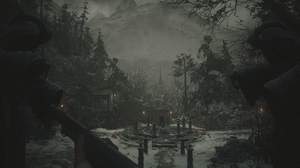
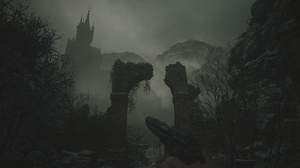
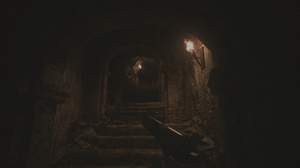
1 day, 14 hours ago
Cine80 - Kodak Vision
Preset description:
Cine80 - Dark Cinematic FX
Installation
Step 1
Download and install ReShade: https://reshade.me
When installing, select Resident Evil Village, DirectX 10/11/12 (since it uses DirectX 12), and the following shaders (feel free to select more, but my presets use these):
SweetFX by CeeJay.dk
SHADERDECK by TreyM
The Anagrama Collection by nullfractal
reshade-shaders by Barbatos
Step 2
Once installed, download the Cine80 preset, then copy/paste the Cine80 preset to your game directory.
It is usually C:\Program Files (x86)\Steam\steamapps\common\Resident Evil Village BIOHAZARD VILLAGE
Step 3
Then, launch the game, open the ReShade overlay, and select the Cine80 preset.
Step 4
Enjoy!
Notes
The DS version is a desaturated and grittier version of the respective preset.
Performance impact: None/minimal (I have not noticed any noticeable performance/FPS drop myself).
Description
My ReShade preset collection going for that vintage dark cinematic vibe.
The focus is on ease of customization, minimizing FPS loss, and preserving the original feel of the game, while still making a dramatic difference.
The result is a retro, cinematic, dark, and gritty visual style reminiscent of 80s movies.
I went for a dark and cold palette that emphasizes the harsh winter landscapes and gothic horror aesthetic.
Only the top-level shader variables are being customized in my presets, so you can easily customize the settings to your personal preferences.
If you find the film grain a little too much, just edit the last effect, FilmGrain.fx, or you can also disable it altogether, since Filmdeck.fx is already adding some subtle film grain.
I just prefer the extra gritty film grain from the stock FilmGrain.fx effect on top of it.
Credits
CeeJayDK, Crosire, BarbatosBachiko, nullfrctl, TreyM
Capcom for this awesome game
Techniques=Vignette@Vignette.fx,ColorGrading@ColorGrading.fx,Technicolor2@Technicolor2.fx,Blur@blur.fx,Deband@Deband.fx,FILMDECK@FILMDECK.fx,FilmGrain@FilmGrain.fx
[blur.fx]
Aphysical=0
Blend=0.100000
Dither=0
Offset=1.000000,1.000000
Threshold=10.000000
W=2.000000
[ColorGrading.fx]
Brightness=-0.100000
Contrast=0.750000
EndColorGradingMethod=5
GradingInterpolationFactor=0.500000
SaturationFactor=1.000000
StartColorGradingMethod=2
[Deband.fx]
banding_depth=1.000000
debug_output=0
enable_depthbuffer=0
enable_sdeviation=1
enable_weber=1
iterations=1
range=24.000000
t1=0.007000
t2=0.040000
[FILMDECK.fx]
AUTO_PUSH=100
AUTO_TEMP=0
CLIP_CAL=0
CONTRAST=0
ENABLE_FLK=0
ENABLE_GRADE=1
ENABLE_GW=0
ENABLE_HAL=1
ENABLE_RES=1
FILM_FORMATN=1
FILM_FORMATP=2
FILM_NEGATIVE=3
FILM_PRINT=1
FLK_INT=50
GAIN=0.500000,0.500000,0.500000
GAMMA=0.500000,0.500000,0.500000
GRAIN_N=50
GRAIN_P=50
GREYS=0.500000,0.500000,0.500000
GREY_CAL=0
HAL_AMT=33
HAL_SEN=85
HAL_WDT=75
HUEBlue=0.250000,0.250000,0.750000
HUECyan=0.250000,0.750000,0.750000
HUEGreen=0.250000,0.750000,0.250000
HUEMagenta=0.750000,0.250000,0.750000
HUEOrange=0.750000,0.500000,0.250000
HUEPurple=0.500000,0.250000,0.750000
HUERed=0.750000,0.250000,0.250000
HUEYellow=0.750000,0.750000,0.250000
LEVELS=0,0
LIFT=0.500000,0.500000,0.500000
NEG_EXP=0.000000
N_TEMP=0
OUT_GAMMA=1.000000
PRT_EXP=0.000000
PUSH=0.000000
PUSH_MODE=0
P_TEMP=0
RESOLUTION=100
SATURATION=100
WEAVE_AMT=50
_CALMSG=0
_FLKMSG=0
_HALMSG=0
_INFO1=0
_INFO2=0
_INFO3=0
_INFO4=0
_PATREON2=0
_PUSHMSG=0
_RESMSG=0
_TUT1=0
_WBMASG=0
_WVMSG=0
[FilmGrain.fx]
Intensity=0.500000
Mean=0.500000
SignalToNoiseRatio=6
Variance=0.750000
[Technicolor2.fx]
Brightness=1.000000
ColorStrength=0.980392,0.980392,0.000000
Saturation=0.500000
Strength=0.500000
[Vignette.fx]
Amount=-2.000000
Center=0.500000,0.500000
Radius=2.000000
Ratio=1.000000
Slope=2
Type=0