1 week ago
Rise of the TR GTX1080
Preset description:
MartysMods_LAUNCHPAD.fx,
lumenite_Kernel.fx,
lumenite_TRAA.fx,
lumenite_RTAO.fx,
MartysMods_MXAO.fx,
Clarity.fx,
LumaSharpen.fx,
LevelsPlus.fx,
Technicolor2.fx
[GENERAL]
PreprocessorDefinitions=RESHADE_DEPTH_LINEARIZATION_FAR_PLANE=100,RESHADE_DEPTH_INPUT_IS_UPSIDE_DOWN=0,RESHADE_DEPTH_INPUT_IS_REVERSED=0,RESHADE_DEPTH_INPUT_IS_LOGARITHMIC=0
Check the geometry of the shadows in DisplayDepth.
In the tab Add-ons make sure the checkbox next to your monitor resolution is selected.
Don't forget that for proper operation, you need to disable various types of smoothing within the games themselves—such as motion blur, film grain, and SMAA.
Techniques=MartysMods_Launchpad@MartysMods_LAUNCHPAD.fx,Lumenite_Kernel@lumenite_Kernel.fx,Lumenite_TRAA@lumenite_TRAA.fx,Lumenite_RTAO@lumenite_RTAO.fx,MartysMods_MXAO@MartysMods_MXAO.fx,Clarity@Clarity.fx,LumaSharpen@LumaSharpen.fx,LevelsPlus@LevelsPlus.fx,Technicolor2@Technicolor2.fx
TechniqueSorting=MartysMods_Launchpad@MartysMods_LAUNCHPAD.fx,Lumenite_Kernel@lumenite_Kernel.fx,Lumenite_TRAA@lumenite_TRAA.fx,Lumenite_RTAO@lumenite_RTAO.fx,MartysMods_MXAO@MartysMods_MXAO.fx,Clarity@Clarity.fx,LumaSharpen@LumaSharpen.fx,LevelsPlus@LevelsPlus.fx,Vibrance@Vibrance.fx,Technicolor2@Technicolor2.fx,Daltonize@Daltonize.fx,Deband@Deband.fx,DisplayDepth@DisplayDepth.fx,HQ4X@HQ4X.fx,MartyMods_Sharpen@MartysMods_SHARPEN.fx,Levels@Levels.fx,Lumenite_AnamorphicBloom@lumenite_AnamorphicBloom.fx,MartyMods_FilmGrain@MartysMods_FILMGRAIN.fx,Lumenite_LSAO@lumenite_LSAO.fx,Lumenite_QuantAO@lumenite_QuantAO.fx,LUMENITE_SSSR@lumenite_SSSR.fx,MartysMods_AntiAliasing_Prepass@MartysMods_SMAA.fx,MartysMods_AntiAliasing@MartysMods_SMAA.fx,MartysMods_SOLARIS@MartysMods_SOLARIS.fx,Lumenite_QuantMotion@lumenite_QuantMotion.fx,MultiLUT@MultiLUT.fx,SMAA@SMAA.fx,Technicolor@Technicolor.fx,Tonemap@Tonemap.fx,UIMask_Top@UIMask.fx,UIMask_Bottom@UIMask.fx
[Clarity.fx]
ClarityBlendIfDark=50
ClarityBlendIfLight=205
ClarityBlendMode=5
ClarityDarkIntensity=0.800000
ClarityLightIntensity=0.196000
ClarityOffset=2.000000
ClarityRadius=3
ClarityStrength=0.299000
ClarityViewBlendIfMask=0
ClarityViewMask=0
[LevelsPlus.fx]
ACESLuminancePercentage=100,100,100
ColorRangeShift=0.000000,0.000000,0.000000
ColorRangeShiftSwitch=1
enableACESFilmRec2020=0
enableACESFilmRec2020old=1
enableACESFitted=0
EnableLevels=1
HighlightClipping=0
InputBlackPoint=0.039216,0.039216,0.039216
InputGamma=0.800003,0.800003,0.800003
InputWhitePoint=0.980392,0.980392,0.980392
OutputBlackPoint=0.000000,0.000000,0.000000
OutputWhitePoint=1.000000,1.000000,1.000000
[LumaSharpen.fx]
offset_bias=1.000000
pattern=2
sharp_clamp=0.204000
sharp_strength=0.900000
show_sharpen=0
[lumenite_RTAO.fx]
AO_INTENSITY=0.200000
DEBUG_VIEW=0
DEPTH_BOUNDARY=0.400000
DEPTH_FADE_START=0.750000
[lumenite_TRAA.fx]
DEBUG_EDGES=0
EDGE_MODE=1
HFI_INTENSITY=0.100000
HISTORY_BLEND=0.800000
MAX_SHARP_DIFF=0.100000
SHARP_STRENGTH=1.500000
SHOW_STATUS=0
[MartysMods_LAUNCHPAD.fx]
NORMALS_MODE=1
OPTICAL_FLOW_Q=1
TEXTURED_NORMALS_INTENSITY=0.500000
TEXTURED_NORMALS_QUALITY_ENUM=2
TEXTURED_NORMALS_RADIUS=0.500000
[MartysMods_MXAO.fx]
HELP1=0
MXAO_DEBUG_VIEW_ENABLE=0
MXAO_FADE_DEPTH=0.250000
MXAO_FILTER_SIZE=1
MXAO_GLOBAL_SAMPLE_QUALITY_PRESET=1
MXAO_SAMPLE_RADIUS=1.500000
MXAO_SSAO_AMOUNT=0.800000
MXAO_WORLDSPACE_ENABLE=0
SHADING_RATE=0
[Technicolor2.fx]
Brightness=1.500000
ColorStrength=0.470588,0.078431,0.078431
Saturation=0.999998
Strength=0.600000
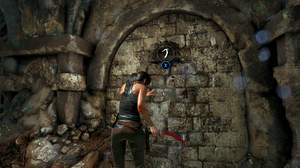
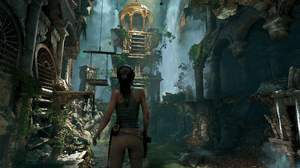
If you can't get it to look like the screenshot, message me on Telegram.